I can select fields from a Supabase table in Rust, fetch the rows, and use those fields without writing another response struct. The query defines its result type.
That is the part of Supabase’s TypeScript workflow I wanted in Rust. In TypeScript, you generate types from your database schema and give them to the client. A query selection can then determine the result type.
supabase-rp is my Rust client for Supabase. It is an independent project, not an official Supabase SDK. It is for async services, CLIs, and tests that use the database API, auth, storage, Edge Functions, or realtime. You can use plain queries without generating anything, or add schema generation for compile-time checked queries.
One query, one result
Generating a Rust struct for a database table gets you part of the way there. A query might only select two columns. Another might include a related record. The response is not necessarily the table’s full row.
I wanted generated bindings to replace manual Supabase types in Rote, a CLI for API workflows that I work on at Modiqo. Table types did not solve the query problem. My first fix was a projection macro, and it still made me declare the result type before I wrote the query. TypeScript does not need that step. The schema already described the columns and relationships. Why write the result fields again?
This is the plain query path. The column names live in a string, and the field names and types live in a struct:
#[derive(serde::Deserialize)]
struct MessageResponse {
    id: i64,
    body: String,
    note: Option<String>,
}

let rows: Vec<MessageResponse> = client
    .from("messages")
    .select("id,body,note")
    .eq("id", id.to_string())
    .fetch()
    .await?;
Nothing checks that the string, the struct, and the schema agree until the request runs.
select! removes the struct. This version uses the messages table from the schema-generation example. It assumes the build script has generated a database module from the example’s schema.
use rp_supabase_client::{Postgrest, schema::Selection, select};
use crate::database::public::tables::messages;

async fn print_message(
    client: Postgrest,
    id: i64,
) -> Result<(), Box<dyn std::error::Error>> {
    let selected = select!(messages::Row => { id, body, note });
    let rows = selected
        .query(client)
        .eq(messages::columns::id, &id)
        .fetch()
        .await?;

    for row in rows {
        println!("{}: {}", row.id, row.body);
        if let Some(note) = row.note {
            println!("Note: {note}");
        }
    }

    Ok(())
}
print_message takes a client for PostgREST, Supabase’s database HTTP API. With a supabase_rp::Client, pass client.rest().clone(). There is no MessageResponse and no response type passed to fetch().
In this schema, body is a String and the nullable note is an Option<String>. The filter uses a generated column instead of a string containing its name. The compiler rejects a nonexistent selected field or an incompatible filter value.
Change the selection, and the result changes with it. Remove note while keeping row.note, and that field access no longer compiles.
Named types still make sense for shared results and public function signatures. The client supports named projections for those. Local queries do not need a separate struct just to describe the fields they select.
The database does not need to be running to build
I generate the bindings in build.rs with rp-supabase-codegen. I did not want a separate CLI step to run before the build.
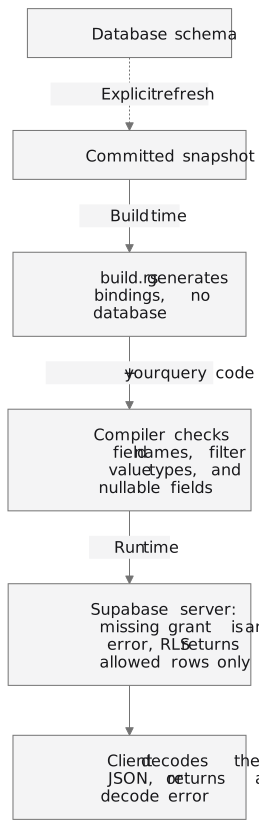
Ordinary builds need neither a running database nor database credentials. The repository’s example includes a snapshot so you can try the selection workflow before connecting to Supabase.
The compiler checks your code against the schema you captured, not whatever happens to be deployed today. After a schema change, refresh the snapshot and regenerate.
The compiler also does not know who is asking. Row-level security (RLS) filters rows instead of failing, so a query that compiles can still come back empty.
The generator also supports direct database introspection if that fits your build setup better. The codegen guide shows both paths and the snapshot commands.
Where I use it, and where it falls short
Rote uses supabase-rp with generated schema bindings. Its registry client, the part that talks to Rote’s Supabase backend, runs 8 select! queries and 4 named projections, plus auth and storage calls.
Realtime does not reconnect automatically when the websocket closes. Storage has no resumable uploads or image transformations. Auth does not store sessions, and OAuth redirects need your own handling. Check the coverage and limits against your app before choosing it.
Other Rust clients also generate checked columns. rust_supabase_sdk does, and its typed queries return the full row type. Here the selection defines the result. It also covers more of Supabase than supabase-rp does: OAuth, session storage, realtime reconnect, and image transformations. If you need those today, look at it first. The comparison guide covers it and two other clients.
Try it
The entry point is supabase-rp on crates.io. To add the client with its full feature set:
cargo add supabase-rp --features fullThat is enough for plain queries. The typed layer is the rp-supabase-client crate, which the code above imports. The codegen setup adds it, adds rp-supabase-codegen as a build dependency, and shows the build.rs that writes the bindings.
To try schema generation without connecting a database, clone the repository and run the committed-snapshot example from its root:
cargo run -p rp-supabase-codegen-exampleWith no live database configuration, it generates bindings and decodes fixture data. It does not make a live Supabase request. The example README also has a live scenario. Run it against a throwaway database.
There are also service examples, API docs, and an issue tracker for bugs and missing use cases.
Start with the snapshot example. Delete a field from its select! and build. There is no struct to update. Only the line that still reads the field fails.